Create and Reuse SMS Message Templates

TextTorrent helps teams save reusable SMS message templates, keep common business copy consistent, and select reviewed messages during campaigns or customer conversations. Organize active templates so authorized users spend less time rewriting the same replies.

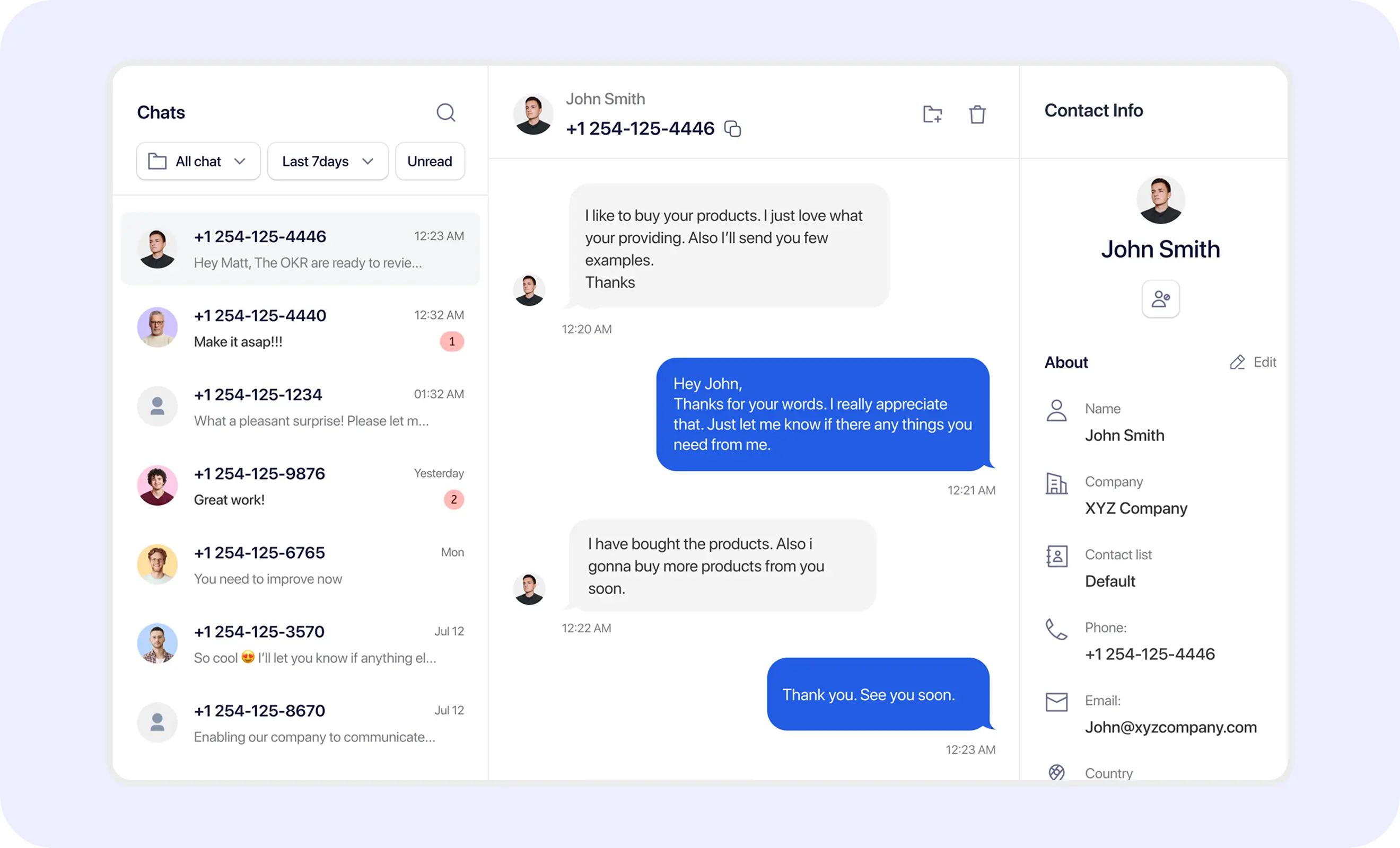
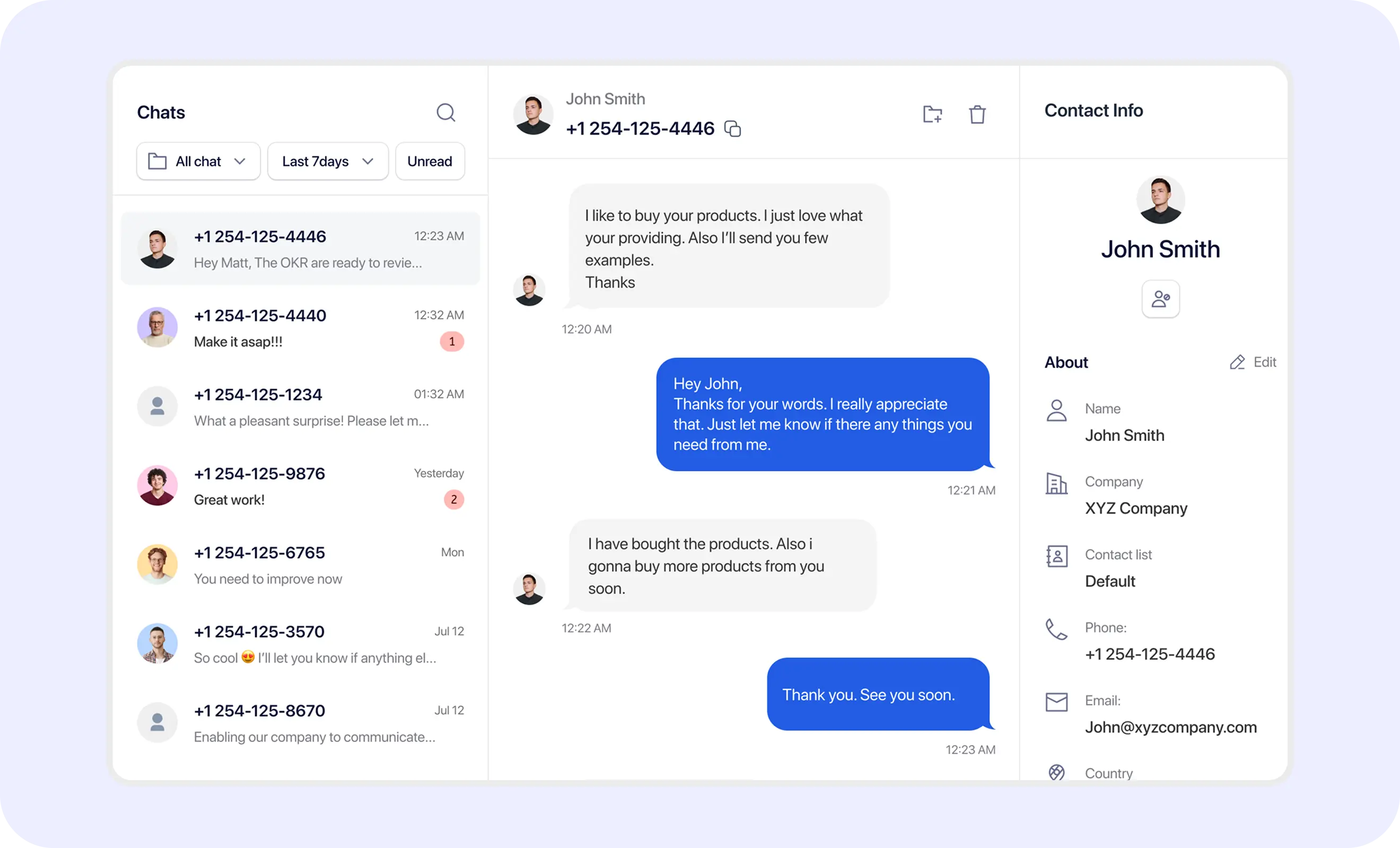
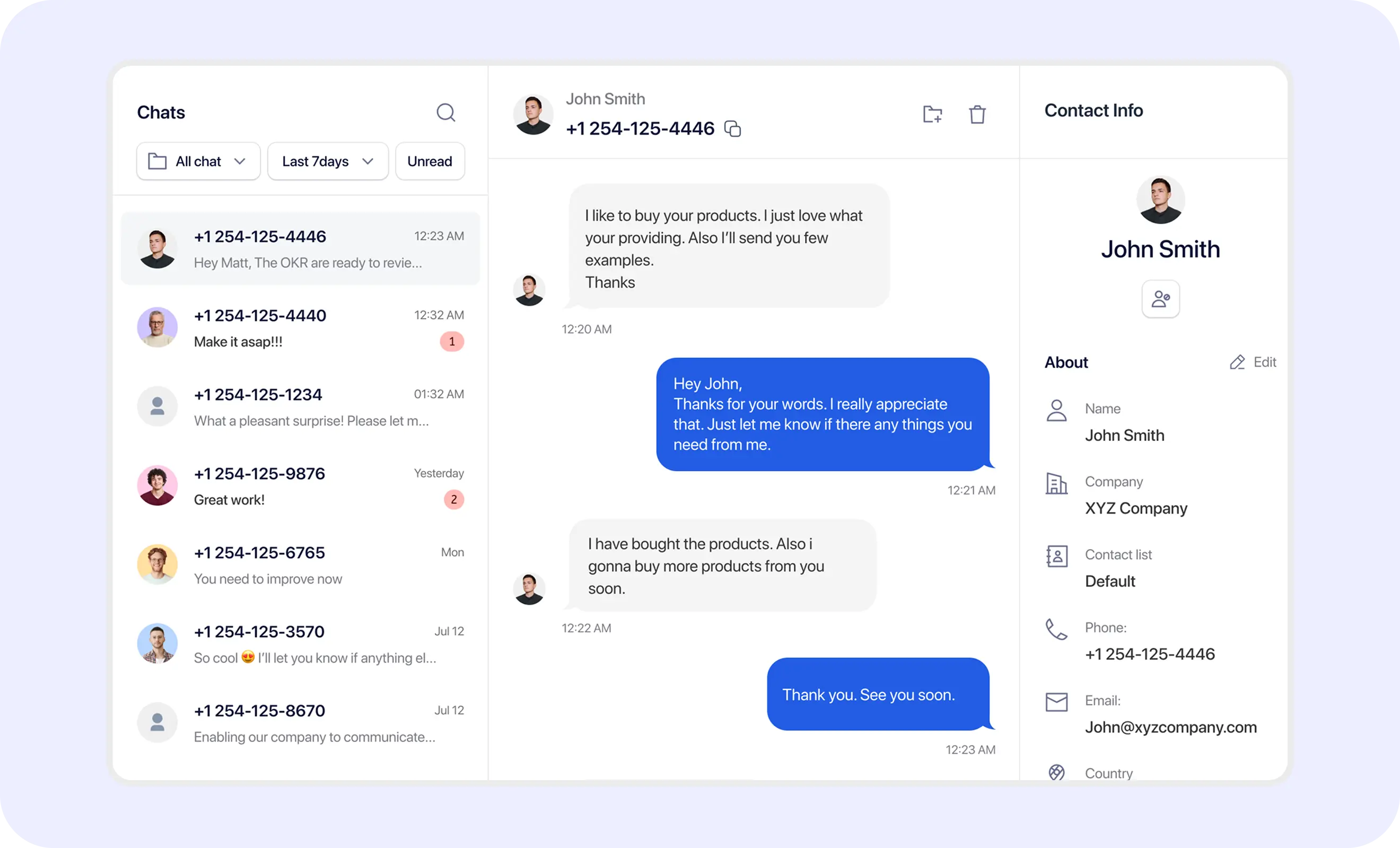
TextTorrent SMS template library showing reusable business messages and approval status

No credit card required

Save Reusable Messages

Keep Team Messaging Consistent

Select Templates Inside Workflows

The Challenge

Rewriting the Same Business Messages Creates Inconsistency

When teams rewrite reminders, follow-ups, and common replies from scratch, messaging quality becomes harder to control.

Teams Repeat the Same Work

Teams Repeat the Same Work

Reminders, follow-ups, status updates, and common responses are often written repeatedly across campaigns and conversations.

Copy Changes Between Users

Copy Changes Between Users

Different team members may describe the same process differently, which makes customer communication less consistent.

Important Language Can Be Omitted

Important Language Can Be Omitted

Business identification, required details, links, or opt-out wording may be missed when messages are rewritten under pressure.

Old Messages Become Outdated

Old Messages Become Outdated

Saved copy must still be reviewed when offers, dates, policies, or workflows change. Templates reduce rewriting—they do not remove review.

The TextTorrent Template Library

Organize Reusable SMS Copy in One Workspace

TextTorrent connects a message template library, template creation, active and inactive status, search, campaign selection, inbox replies where supported, user or assignee access, sub-account context, supported placeholders, and message-length awareness during send or campaign preparation.

TextTorrent message template workspace showing saved SMS templates, status, and actions
Create and review reusable messages before using them in customer-facing workflows.
How It Works

How to Create and Use an SMS Template with TextTorrent

Reusable templates work best when creation, review, selection, and a final message check stay connected before anything reaches a customer.

01

Create a Template

Add a template name and message body using the TextTorrent template form so the copy is ready for later reuse.

02

Add Supported Placeholders

Use only personalization variables supported by TextTorrent, such as {first_name} and {last_name}, plus spin text where appropriate.

03

Review Message Length

Check how encoding, placeholders, links, and opt-out wording may affect SMS segments and credit usage before relying on the template.

04

Set Status and Access

Keep the template active when it should be available, inactive when it should not be used, and assign users where that control is needed.

05

Select the Template

Choose the saved template inside a campaign, inbox reply, or other supported messaging workflow.

06

Review the Final Message

Confirm placeholders, links, dates, audience, consent, and opt-out language before the message is sent or scheduled.

07

Send or Schedule

Use the final reviewed message in the appropriate campaign, conversation, or scheduling workflow.

  1. Create
  2. Add supported fields
  3. Review length
  4. Set status
  5. Select
  6. Final review
  7. Send or schedule
Template Builder

Create Reusable Copy for Common Business Messages

Create a template with the fields TextTorrent supports today, then reuse that copy when the same message purpose comes up again.

Template name

Template name

Required name for the reusable message (up to 255 characters).

Message body

Message body

The template content saved as preview_message, including supported placeholders or spin text.

Status

Status

Active or inactive controls whether the template is available for use.

Assignees

Assignees

Optional user assignments. An empty assignee list means the template can be available to all users in the relevant context.

  • Lead follow-up
  • Appointment reminder
  • Document reminder
  • Status update
  • Property alert
  • Renewal reminder
  • Customer-support reply
  • Promotion
  • Opt-in confirmation

These category names are practical examples for organizing your own library. They are not claimed as default product category values unless confirmed in the current interface.

TextTorrent SMS template creation form showing template name, message body, and preview
Message Review

Review Templates Before They Are Used by the Team

TextTorrent template availability is controlled with active and inactive status, user ownership, and optional assignees. Parent accounts can review supported sub-user templates where that access is available.

Use status and access controls to keep reusable copy available only when it should be used. A multi-step legal or carrier-approval chain is not claimed.

Active

Active

The template is available for messaging work where the user has access.

Inactive

Inactive

The template is not available for use until it is set active again.

Parent review

Parent review

Parent accounts can review supported sub-user templates where that access is available.

  1. User creates a template
  2. Template is available for that user’s messaging work when active
  3. Parent reviews supported sub-user templates when needed
  4. Template is selected in a campaign or conversation reply
  5. Final message is reviewed before send or schedule
TextTorrent SMS template approval workflow showing template status

Draft, pending, approved, and rejected are not published as verified template status labels. Confirm exact UI labels in the current product.

Template Management

Find the Right Message Without Searching Through Old Campaigns

Keep reusable messages organized so teams can locate the correct campaign or reply copy quickly.

Organization capabilities

  • Search by template name
  • Review active versus inactive templates where status is shown
  • Sort template lists where supported
  • Preview message content
  • Create, update, and delete templates
  • Assign templates to specific users where needed
  • Export templates where supported

Naming guidance

  • Use a clear message purpose in the template name.
  • Include the industry or workflow when useful.
  • Avoid vague names such as Template 1.
  • Separate reminders from promotional messages.
  • Retire outdated templates by setting them inactive or deleting them when appropriate.

Exact filter chips, archive behavior, and duplication controls should match the current interface. Search by template name is verified in the TextTorrent API.

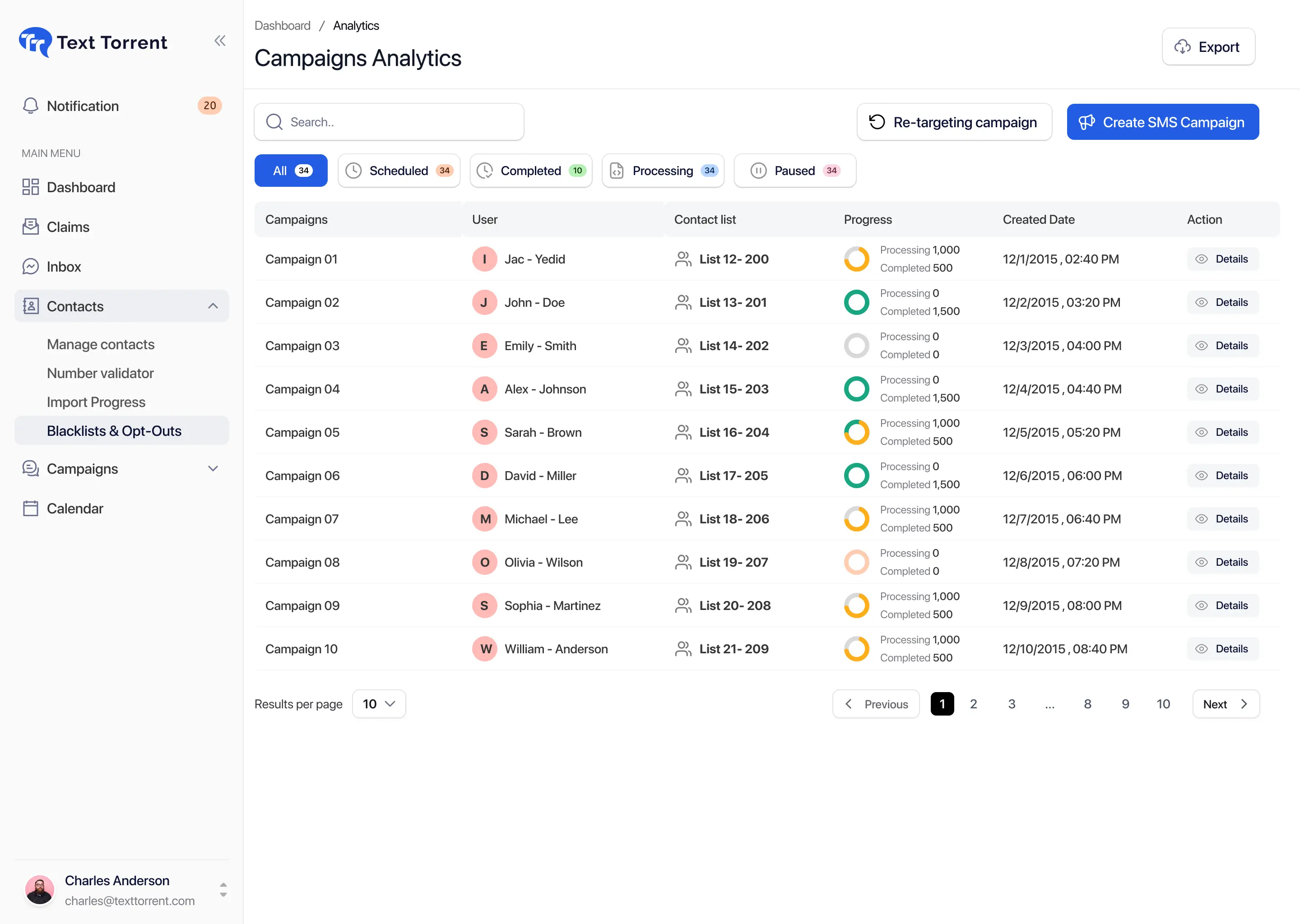
TextTorrent SMS template library with search and approval-status filters
Supported Variables

Use Verified Placeholders Without Creating Broken Messages

TextTorrent templates support a limited set of personalization variables and spin-text variations. Variables are replaced when the message is sent.

{first_name}

{first_name}

Inserts the contact’s first name when available.

{last_name}

{last_name}

Inserts the contact’s last name when available.

{option1|option2|option3}

{option1|option2|option3}

Spin text randomly selects one of the listed options when the message is prepared for sending.

Placeholder safeguards

  • Preview how the final value will read.
  • Check missing contact data before relying on a placeholder.
  • Avoid inserting sensitive information into template variables.
  • Confirm the placeholder format matches TextTorrent syntax.
  • Test with approved internal contacts before a production send.
  • Do not assume every contact has every field populated.

Example template wording

Hi {first_name}, this is {Company Name}. Your appointment is scheduled for [Date] at [Time]. Reply STOP to opt out.

Only {first_name}, {last_name}, and spin-text syntax are verified product variables. Bracketed values such as company name, date, and time are illustrative placeholders you would write as plain text or confirm separately before use.
Message Length

Review Character and Segment Usage Before Saving a Template

Reusable copy still needs a length check. Encoding, placeholders, links, and opt-out wording can change how many SMS segments a final message uses.

  • Standard GSM-7 SMS messages may fit within 160 characters for a single segment.
  • Multi-part GSM-7 segments commonly use up to 153 characters each because of concatenation headers.
  • Unicode (UCS-2) messages may fit within 70 characters for a single segment, or about 67 characters per multi-part segment.
  • Placeholder values can increase the final message length after personalization.
  • Links and opt-out wording count toward message length.
  • MMS follows different credit and media rules.
  • Credits are charged per SMS segment. Own Gateway SMS uses 1 credit per segment; TextTorrent Gateway SMS uses 3 credits per segment.

Do not assume every 160-character draft always uses one segment. Encoding, concatenation, emojis, and expanded placeholders can change the result. Confirm the current campaign or send preview before a large send.

TextTorrent SMS template editor showing message character and segment information
Campaign Templates

Select a Reviewed Message While Building a Campaign

Bulk SMS campaigns can use a saved template so teams start from consistent copy instead of rewriting every send.

Explore bulk SMS software

  1. Create or open a campaign.
  2. Select the audience.
  3. Choose a saved template.
  4. Review placeholders.
  5. Review message length and segments.
  6. Add or confirm opt-out language.
  7. Select the sending number.
  8. Send or schedule.
  • Selecting a template does not remove the need to review audience, offer, date, link, consent, and registered use case.
  • Campaign creation expects a template selection as part of the send workflow.
  • Schedule the final reviewed message when timing matters.
TextTorrent bulk SMS campaign builder showing message template selection
Conversation Templates

Use Reusable Responses for Common Customer Questions

Inbox templates help teams reuse reviewed replies for common conversation moments without treating every response as a brand-new draft.

Explore the shared SMS inbox

Common reply uses

  • Appointment confirmation
  • Document instructions
  • Business hours
  • Property details
  • Support information
  • Next-step explanations
  • Opt-out or HELP guidance

Before you send

  • Read the actual customer message first.
  • Confirm the template answers the question.
  • Edit the copy when the situation needs a more specific reply.
  • Avoid sending a generic response to a sensitive issue.
  • Check contact and opt-out status before replying.
TextTorrent shared SMS inbox showing reusable message template selection

Related workflows: Shared SMS Inbox, Two-Way Text Messaging.

Automation Messages

Keep Automated SMS Copy Consistent with Reviewed Templates

Automated workflows can send SMS messages for follow-up, reminders, and status updates. Reuse reviewed template wording when preparing those messages, and confirm whether your automation builder supports selecting a saved template before relying on that path.

  • Common automation use: New contact acknowledgment
  • Common automation use: Lead follow-up
  • Common automation use: Appointment reminder
  • Common automation use: Document reminder
  • Common automation use: Stage-change message
  • Common automation use: Task-related notification
  • Review before enabling: Trigger accuracy
  • Review before enabling: Audience consent
  • Review before enabling: Message purpose
  • Review before enabling: Delay timing
  • Review before enabling: Placeholder data
  • Review before enabling: Stop conditions
  • Review before enabling: Opt-out handling

Direct template selection inside every automation action is not claimed as verified. Link automation message content back to reviewed reusable copy before enabling a live workflow.

Team and Client Workspaces

Keep Templates Inside the Correct Account or Sub-Account

Message templates are user-specific. Parent accounts can review supported sub-user templates where that access is available, which helps agencies and teams keep reusable copy in the right operational context.

  1. Create a client-specific template for the relevant user.
  2. Confirm the client’s business name and use case in the message body.
  3. Set the template active when it is ready for use.
  4. Keep the template available to the assigned user or assignees.
  5. Use it with the client’s number and contact audience.
  • Sub-account users create templates for their own messaging work.
  • Parent accounts can review supported sub-user templates where available.
  • Assignees can limit which users may access a campaigning template.
  • Cross-account template sharing across every workspace is not claimed.
  • A multi-step enterprise approval chain is not claimed.
TextTorrent template approval workflow inside a sub-account

Continue exploring

Explore SMS sub-accounts
Common Templates

Create Reusable Messages for Frequent Business Workflows

These educational starting points show how reusable SMS copy can support common business workflows. Adapt every example to the actual consent process and registered use case.

Merchant Cash Advance

Who sends

MCA providers and funding teams

Why

Reuse a clear next-step message after a funding inquiry without promising approval.

  • Hi {first_name}, this is [Company Name]. We received your request for business funding information. Reply here if you would like to discuss the next steps. Reply STOP to opt out.

Avoid guaranteed approval or funding claims in reusable templates.

Explore Merchant Cash Advance messaging

Real Estate

Who sends

Agents and brokerage teams

Why

Reuse property-alert wording that invites a viewing conversation.

  • Hi {first_name}, a new property is available in [Area]. View the details here: [Link]. Reply if you would like to schedule a showing. Reply STOP to opt out.

Update area, link, and timing details before each campaign.

Explore Real Estate messaging

Mortgage

Who sends

Mortgage brokers and loan officers

Why

Reuse document-reminder language that directs customers to an approved submission process.

  • Hi {first_name}, we are still missing your [Document Name] for your mortgage application. Please use the approved submission process or reply if you need help. Reply STOP to opt out.

Do not request sensitive documents through an unapproved channel.

Explore Mortgage messaging

Insurance or Appointment Reminder

Who sends

Insurance and operations teams

Why

Reuse appointment reminder copy with clear reschedule options.

  • Hi {first_name}, this is a reminder about your appointment with [Company Name] on [Date] at [Time]. Reply if you need to reschedule. Reply STOP to opt out.

Replace dates, times, and company details before sending.

Explore Insurance or Appointment Reminder messaging
Avoid These Mistakes

Common Problems with Reusable SMS Copy

Templates save time only when teams still review audience, wording, and operational details before each send.

Using One Template for Every Audience

Using One Template for Every Audience

Different workflows may require different copy and consent. Reusing the wrong message can confuse recipients.

Forgetting to Update Dates or Links

Forgetting to Update Dates or Links

Old information can create customer confusion and reduce trust in the business number.

Leaving Placeholder Values Empty

Leaving Placeholder Values Empty

A broken personalization token reduces clarity. Check contact data before relying on {first_name} or {last_name}.

Treating Active as Permanently Correct

Treating Active as Permanently Correct

Offers, policies, and workflows change. An active template still needs periodic review.

Omitting Business Identification

Omitting Business Identification

Recipients should understand who is messaging them where appropriate for the use case.

Missing Opt-Out Language

Missing Opt-Out Language

Include applicable opt-out instructions and respect STOP handling in the broader messaging system.

Using Aggressive or Misleading Claims

Using Aggressive or Misleading Claims

Avoid false urgency and unsupported promises in reusable campaign or sales copy.

Reusing a Template Outside Its Registered Use Case

Reusing a Template Outside Its Registered Use Case

A saved message should remain aligned with the approved campaign purpose and registration details.

Responsible Operations

Review Every Template Before It Reaches a Customer

Reusable messaging tools help teams stay consistent. They do not replace consent, registration accuracy, or message review.

  • Use accurate business identification.
  • Keep templates aligned with the registered use case.
  • Review opt-in and opt-out requirements.
  • Avoid sensitive data in placeholders.
  • Test links.
  • Review dates and offers.
  • Confirm character and segment usage.
  • Remove or deactivate outdated templates.
  • Limit template access according to role and operational need.
  • Use approved secure channels for sensitive documents.
  • Keep customer-support responses relevant to the conversation.
  • Review examples with qualified legal or compliance counsel where necessary.

TextTorrent provides reusable messaging tools, not legal advice. Customers remain responsible for consent, message accuracy, opt-out language, privacy, and compliance with applicable laws, carrier requirements, industry rules, and the terms of their messaging registration.

Why TextTorrent

Connect Reusable Messages with the Rest of Your SMS Workflow

TextTorrent keeps templates connected to campaigns, conversations, account access, and message-length awareness instead of treating reusable copy as a disconnected notepad.

Template Library

Template Library

Store and organize reusable business messages with searchable names and status controls.

Status and Review Controls

Status and Review Controls

Use active or inactive status, assignees, and parent review of supported sub-user templates where available.

Campaign Selection

Campaign Selection

Choose templates while building bulk or scheduled campaigns.

Conversation Responses

Conversation Responses

Use reviewed messages during customer conversations where inbox templates are supported.

Account Context

Account Context

Keep templates connected to user ownership, assignees, and sub-account messaging work.

Frequently Asked Questions

SMS Message Template Questions, Answered

Practical answers for teams evaluating TextTorrent for reusable business SMS copy.

An SMS message template is reusable message copy saved for future campaigns, conversations, or other supported messaging work. In TextTorrent, templates help teams keep common wording consistent instead of rewriting the same messages repeatedly.

Yes. You can create a template with a template name, message body, active or inactive status, and optional assignees. Templates can include supported placeholders and spin text.

TextTorrent controls template availability with active and inactive status, user ownership, and optional assignees. Parent accounts can review supported sub-user templates where that access is available. A dedicated multi-step legal approval workflow is not claimed.

Yes. Verified variables include {first_name}, {last_name}, and spin-text formats such as {option1|option2|option3}. Variables are replaced when the message is sent. Confirm contact data before relying on personalization.

You can update an existing template’s name, content, status, or assignments. Because TextTorrent uses active and inactive status rather than a separate approved status label, review the updated copy before using it again in customer-facing sends.

Yes. Bulk SMS campaign creation can select a saved template as part of the campaign workflow. Still review audience, placeholders, opt-out language, and the registered use case before sending or scheduling.

Yes. Inbox templates are available for conversation replies where supported, so teams can reuse reviewed responses for common customer questions. Always read the customer message and edit the reply when needed.

Automation workflows can send SMS messages for follow-up and reminders. Reuse reviewed template wording when preparing those messages. Confirm whether your automation builder currently supports selecting a saved template before relying on that workflow.

No. Templates help teams reuse reviewed copy, but businesses remain responsible for consent, message content, opt-out language, privacy, registration accuracy, and compliance.

Encoding, placeholders, links, and total characters can affect SMS segments and credit usage. GSM-7 messages commonly use up to 160 characters for a single segment or about 153 characters per multi-part segment. Unicode messages use lower limits. Credits are charged per segment, and TextTorrent Gateway SMS uses more credits per segment than Own Gateway SMS.