

Import or Select Your Contacts
Add contacts in TextTorrent and organize them into groups so each campaign reaches the right audience.
TextTorrent helps businesses create, schedule, send, and analyze bulk SMS campaigns from one platform. Organize contact groups, manage two-way replies, and review campaign activity without stitching together disconnected tools.
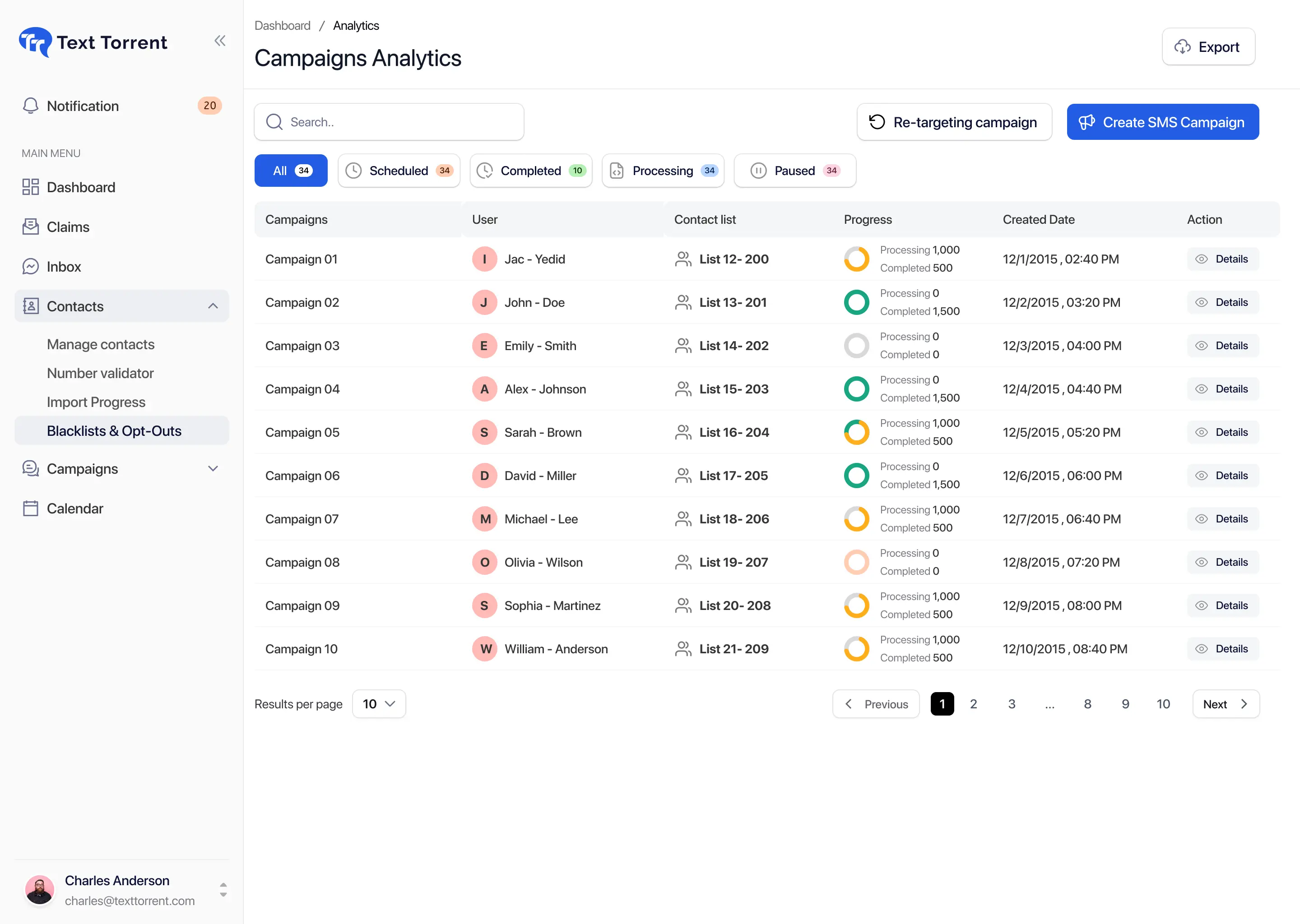
When teams send mass texts from disconnected spreadsheets, basic phone tools, or one-off messaging apps, campaigns become harder to prepare, harder to follow up on, and harder to measure.

Contacts stored across CRMs, spreadsheets, and inboxes make audience selection slow and segmentation unreliable when you need to send a campaign.

Sending one message at a time may work for a handful of contacts, but it breaks down quickly for business campaigns that need consistent timing and clear ownership.

Outbound campaigns often generate inbound questions. Without a shared inbox workflow, replies get missed or scattered across personal devices.

Teams need campaign-level sending and delivery activity to decide what to adjust next. Without that visibility, follow-up becomes guesswork.
TextTorrent connects contact management, audience groups, campaign creation, message templates, scheduling, sending numbers, replies, and campaign analytics in one messaging workspace.
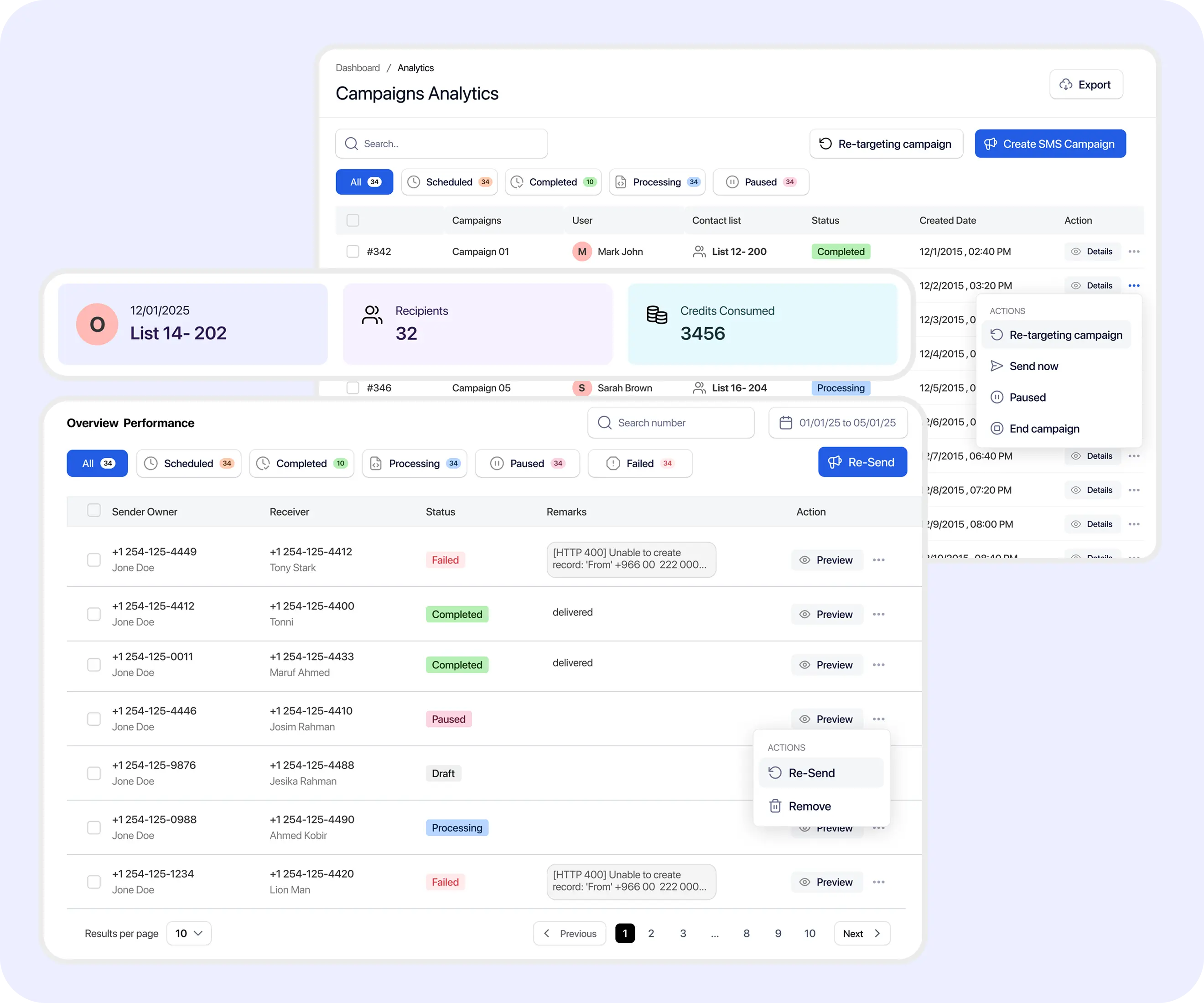
Use a clear campaign workflow so audience selection, message content, and timing stay organized before you send.
Add contacts in TextTorrent and organize them into groups so each campaign reaches the right audience.
Start a new bulk SMS campaign and give it a clear name so your team can identify it later in reporting.
Select one or more contact groups relevant to the message instead of broadcasting to every subscriber.
Compose the message in the campaign builder or use an approved saved template for consistent team communication.
Send immediately when timing is right, or schedule the campaign for a later date and time.
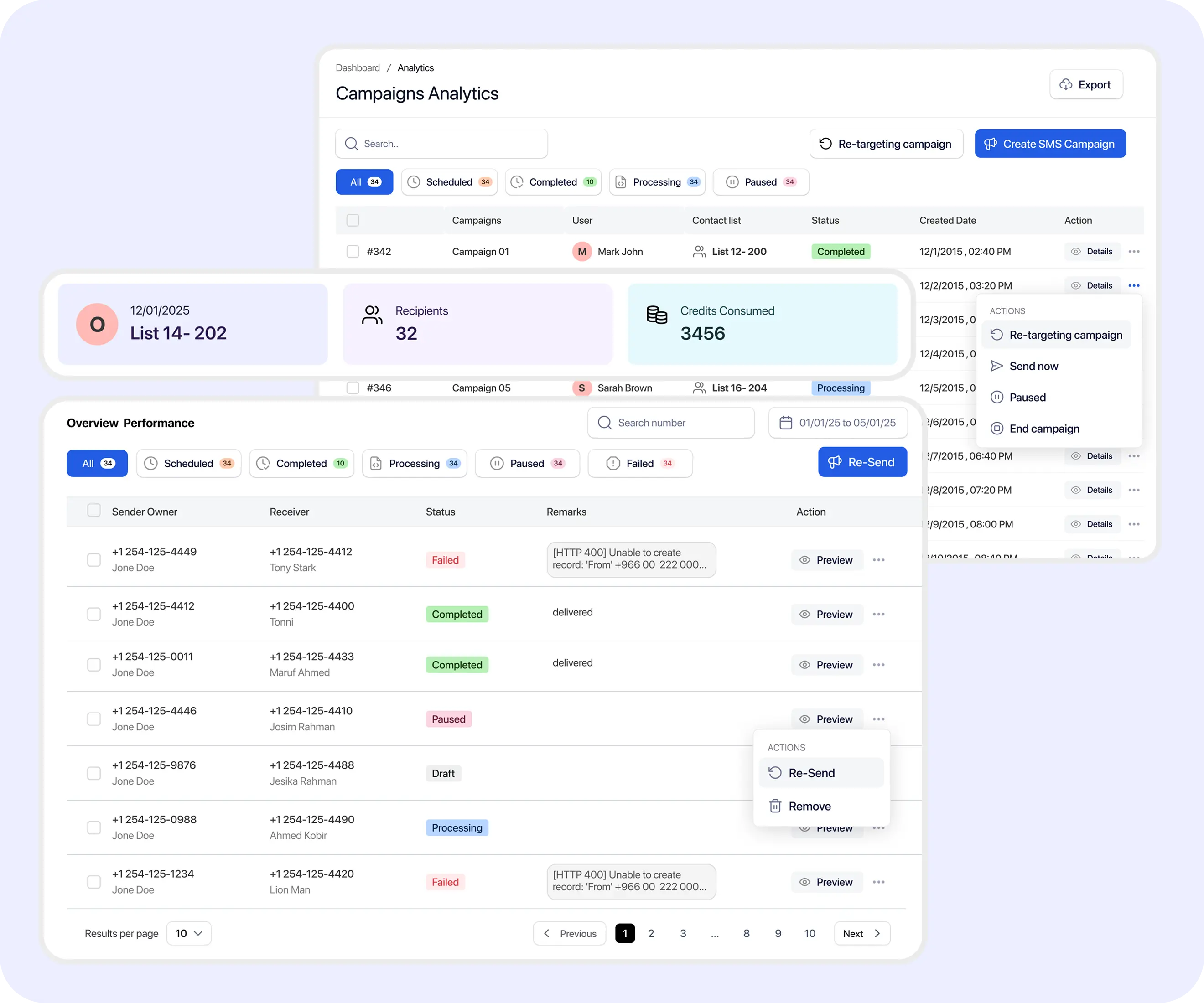
Review message activity, delivery information where available, replies, and campaign details after sending.
Use TextTorrent’s campaign tools to prepare audiences, control send timing, support replies, and review what happened after each send.
Organize contacts into relevant audiences so each campaign reaches the people who should receive that message—not your entire list.

Prepare campaigns ahead of time and choose a future sending window that matches your team’s workflow and customer expectations.

Reuse approved message templates to reduce repetitive writing and keep team communication more consistent across campaigns.

Send campaigns from supported TextTorrent business numbers. Availability depends on supported inventory—not every area code is guaranteed.

Include pictures in supported campaigns when MMS is appropriate for the use case and destination support.
When recipients reply, your team can continue the conversation in TextTorrent instead of losing follow-up across personal phones.
Review campaign activity and message statuses so operators can investigate results and plan informed follow-up.

Create follow-up audiences based on relevant campaign activity—such as contacts who replied or did not reply—where supported.
Before a bulk send leaves the platform, review audience selection, message content, the sending number, and whether the campaign should go out now or later.
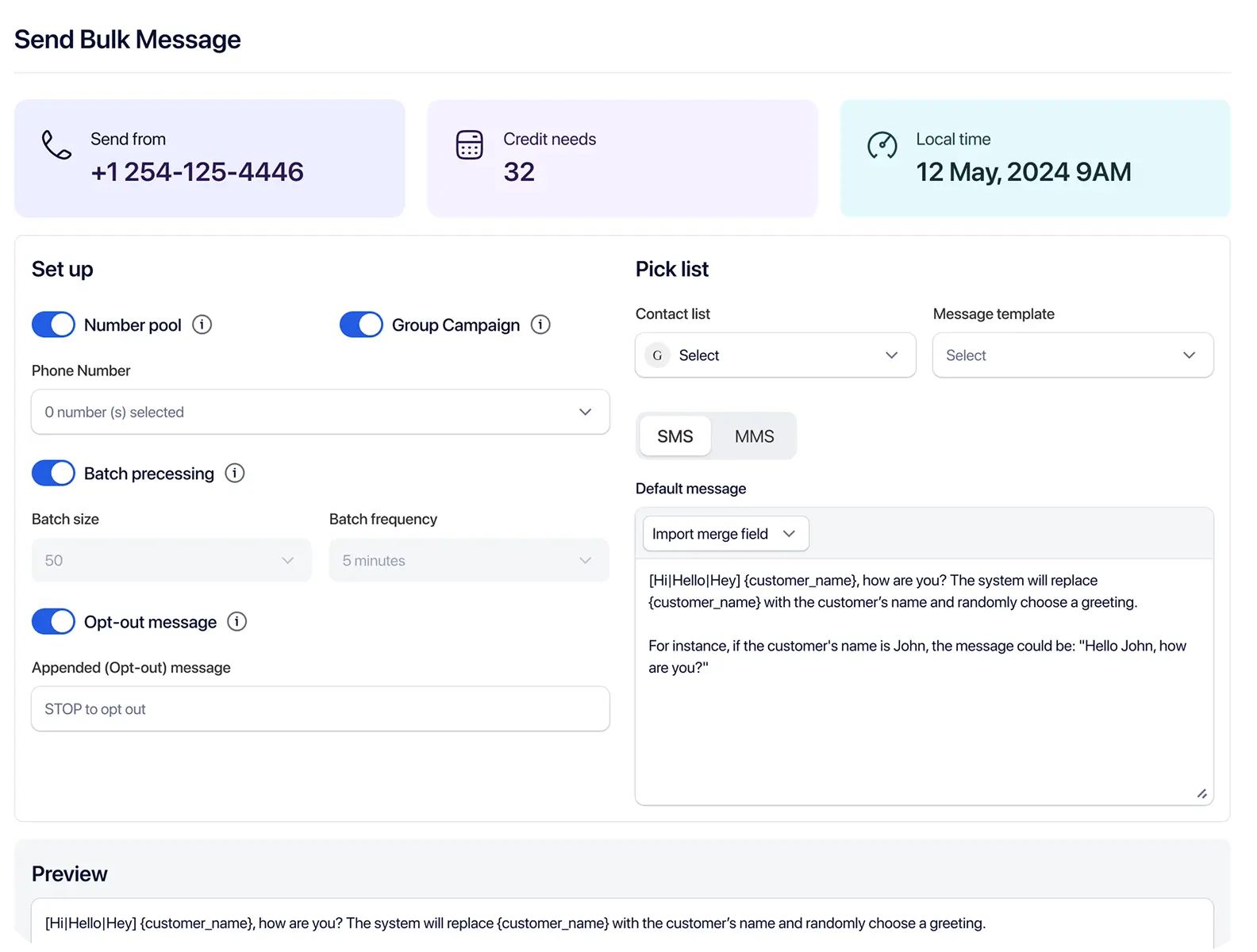
Bulk SMS works best when the sender, purpose, and expected recipient action are clear. These examples reflect how TextTorrent customers commonly apply campaign messaging.
Recipients may reply with questions, upload requested documents, or schedule a next step.
Explore Merchant Cash Advance messagingRecipients may reply to request details, confirm attendance, or ask for more options.
Explore Real Estate messagingRecipients may confirm appointments, send documents, or ask about application status.
Explore Mortgage messagingRecipients may renew, pay, or reply with claim questions.
Explore Insurance messagingRecipients may track an order, visit a product page, or reply with support questions.
Explore E-commerce messagingGuests may confirm a reservation, reply to reschedule, or redeem an offer.
Explore Restaurants messagingExample scenario: a real estate business wants to notify opted-in contacts about a newly available property.
The business selects its relevant buyer group.
It creates or selects a property-alert template.
It adds the property link.
It schedules the campaign.
It reviews campaign activity after send.
Team members respond to interested buyers through two-way messaging.
Message statuses help operators understand campaign progress. Terminology can vary based on provider and carrier responses. A delivery confirmation is not the same as proof that a recipient read the message.
The platform submitted or processed the message for sending.

The message was accepted by the relevant downstream provider or messaging system.

A delivery confirmation was returned where available. This does not mean the recipient opened or read the text.

The message could not be delivered or did not receive a successful delivery result.
Strong bulk SMS operations start with consent, clear identification, and messages that match the registered use case.
TextTorrent provides messaging tools and operational controls, not legal advice. Customers remain responsible for obtaining appropriate consent and complying with applicable laws, carrier requirements, and industry rules.
TextTorrent combines campaign tools and conversation tools so teams can send bulk SMS and handle replies in one place.

TextTorrent assists customers with A2P 10DLC registration without charging a TextTorrent registration-support fee. Registration remains subject to external review.

TextTorrent does not charge an additional platform seat fee when additional users are added. Permissions and roles may still differ by account setup.
Bulk campaigns and two-way customer conversations are available within the same broader platform, so follow-up does not require a separate inbox product.
Businesses can manage messaging numbers and organize teams or clients using supported account structures.

Unused credits roll over while the subscription remains active.
Start with a seven-day free trial, then choose a plan that matches your messaging volume. Full plan details live on the pricing page.
Everything in our starter plan includes
Everything in starter plus
Everything in growth plus
Full access to all platform features
Practical answers for teams evaluating TextTorrent for business bulk messaging.
Bulk SMS software allows businesses to send text messages to selected contact groups through a campaign-based interface. Instead of texting contacts one by one, teams prepare an audience, write or select a message, choose send timing, and review campaign activity afterward.
With TextTorrent, you select contacts, create the campaign, write or select the message, choose a business number, send or schedule the campaign, and then review results. Replies can be handled through TextTorrent’s two-way messaging tools.
Yes. TextTorrent supports campaign scheduling, so you can prepare a bulk SMS campaign and choose a later date and time to send it.
Yes. Supported messages can generate replies that teams manage through TextTorrent’s two-way messaging tools, so follow-up stays inside the platform.
Yes. TextTorrent supports MMS or picture messaging where available, so supported campaigns can include images when that format fits the use case.
Yes. TextTorrent includes contact management tools that let you organize contacts into groups so campaigns can target relevant audiences.
Yes. Users can review campaign activity and message details such as sending and delivery-related statuses where those results are available. TextTorrent does not present delivery as proof that a recipient read the message.
Businesses sending application-to-person traffic over US local 10-digit numbers generally need appropriate A2P 10DLC registration. TextTorrent offers registration support to help customers complete the process, but external review still applies and registration does not replace consent or content obligations.